Jari10 is the best blog to get more information about software, antivirus, linux, windows, games, android, madura, karapan sapi

Tampilkan postingan dengan label Linux. Tampilkan semua postingan

How to create a Vector Penguin

Okay, now we will creat a cute vector penguin.
Follow this step by step Adobe Illustrator tutorial to create a simple vector penguin character. We’ll be using many of Illustrator’s basic shapes to create the structure of the character, which makes this tutorial great for beginners. We’ll then make use of various gradients to really bring the character to life with depth and dimension.

Vector Penguin character
Here’s our cute little chubby penguin character we’ll be creating as part of this tutorial. The whole body is created from various circles and ovals which help give the penguin that cute and friendly appearance, while the gradients and shading help lift the character from the screen with a three dimensional illusion.
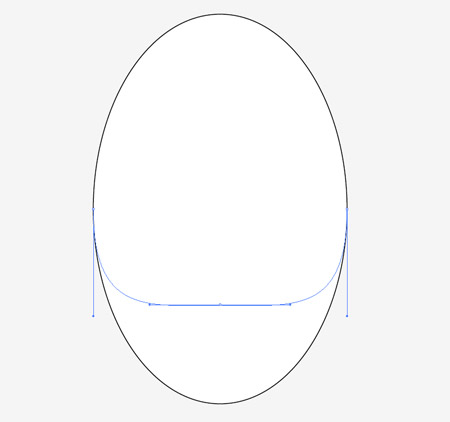
Open up Adobe Illustrator and draw an oval on the artboard, then select and drag the lower most point vertically upwards with the Direct Selection Tool.
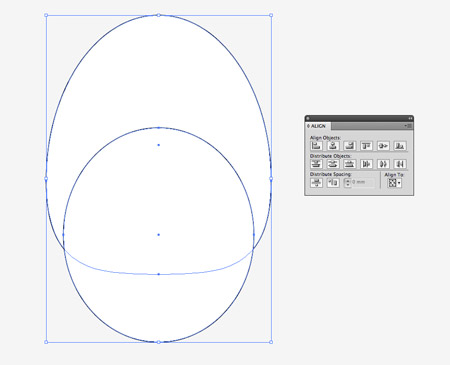
Overlap another oval shape to outline the belly fur, then align the two shapes centrally along the Y-Axis.
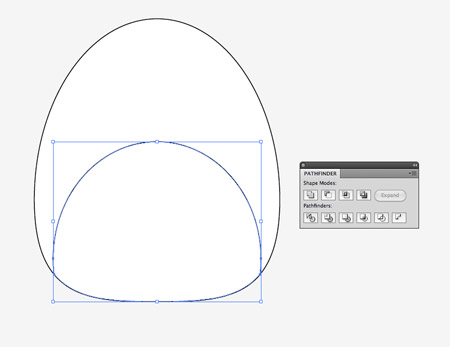
We’ll need to trim down this new shape so copy (CMD+C) and paste in front (CMD+F) a duplicate of the original body outline and send it to the top (CMD+Shift+]). Select this duplicate along with the belly shape and hit the Intersect option from the Pathfinder palette to trim it to size.

Draw another oval to act as a wing. Paste in another copy of the body and use it to trim down the wing shape.
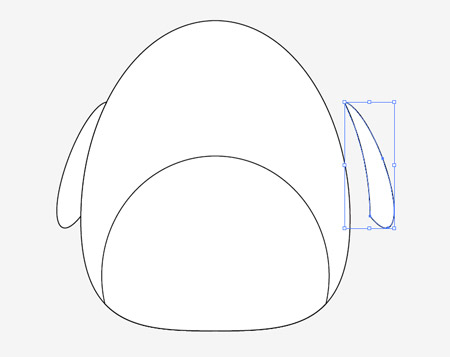
Copy and paste another wing onto the artboard then go to Object > Transform > Reflect. Position the new wing on the opposite side of the body.

Draw a basic foot using three angled ovals. Merge them all together with the Pathfinder palette, copy, flip and position a duplicate on the other side.
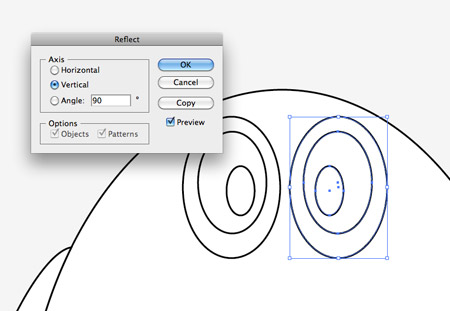
Create an eye using three differently sized circles. Offset the pupil to give the penguin a cute dazed look. Copy, paste and flip a duplicate of the eye shapes and position them next to the originals.
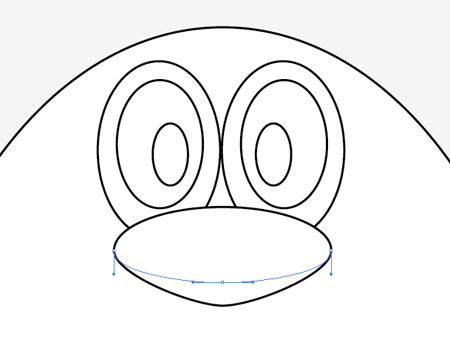
Use another oval as the penguin’s beak, but drag the lower most point downwards and adjust the bezier handles to make a slight point on the lower edge.
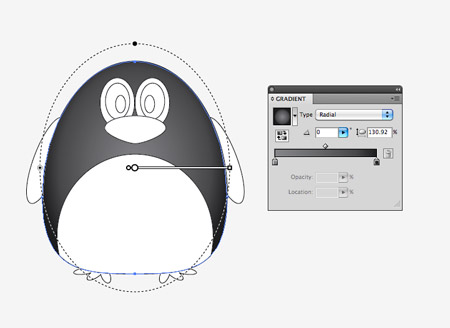
Now the basic structure and linework is complete we can begin bringing the character to life with colour. Replace the default fill and stroke with a grey to black gradient then adjust the angle so it flows radially from the centre of the body.
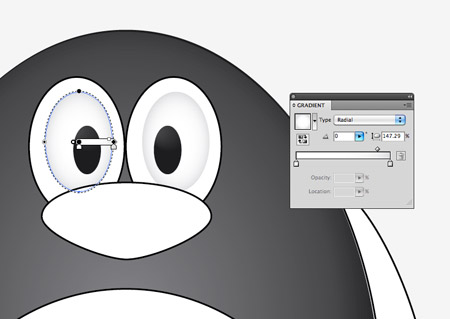
Give the eyes a subtle gradient of their own using a soft grey to white. Adjust the gradient shape to match the outline of the eyeball.
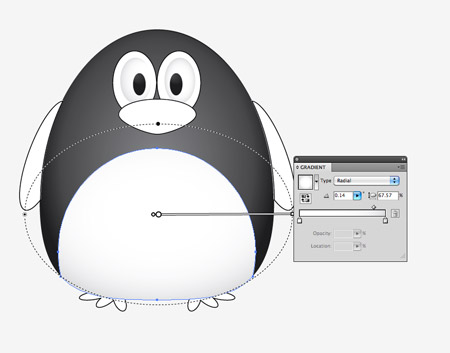
Use a similar grey to white gradient on the belly shape. Adjust this gradient so the lower portion has more grey shading to give a three dimensional appearance.
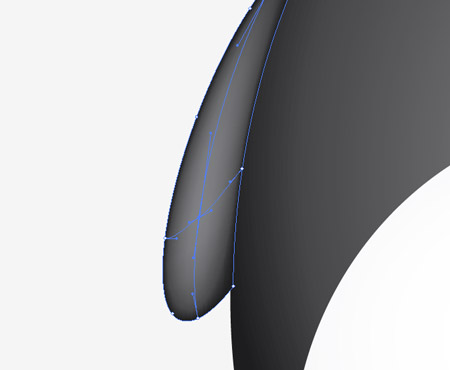
For the wings we’ll use the Gradient Mesh tool. Fill the wings with black first of all, then make a single click in the lower portion of the wing. Select a lighter shade of grey to add this colour to the gradient mesh point. Illustrator will automatically flow the gradient across the shape.
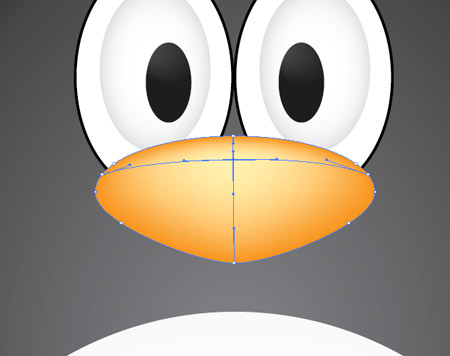
Add another gradient mesh to the beak, but this time start with an orange base colour and add a light yellow tone near the top edge to act as a highlight.
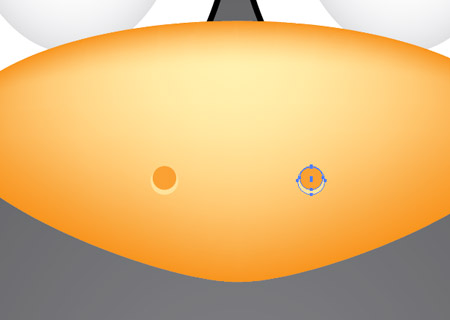
Create a couple of nostrils by overlapping two circles. The bottom circle should be the lighter yellow tone to create a kind of highlight effect.
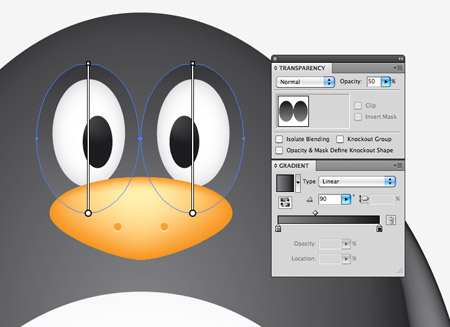
Add the grey to black gradient to the two remaining circles around the eyes as linear gradients, then reduce the opacity to around 50%.

Our penguin is really starting to come to life now it has colour, but there’s a couple more little touches that will help add more definition.
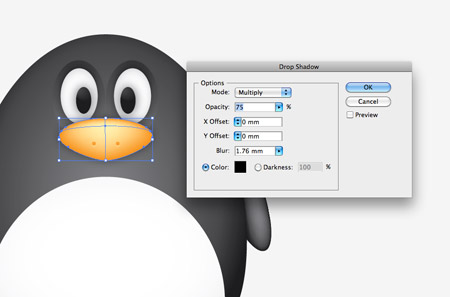
Select the beak and eyes then go to Effect > Stylize > Drop Shadow. Alter the offset to zero then add the effect.
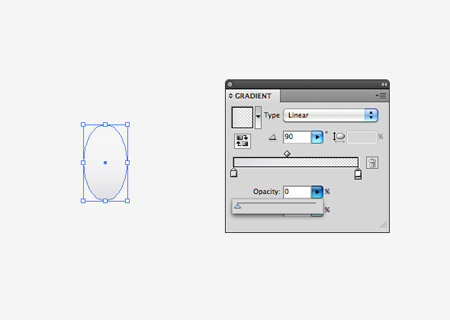
Elsewhere on the artboard draw a small oval with a grey to transparent linear gradient fill.
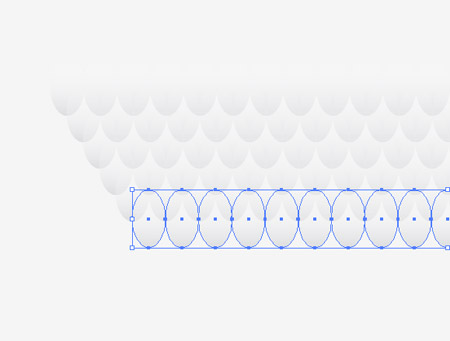
Hold Shift and Alt to drag a duplicate horizontally, then repeatedly press CMD+D to create a complete line. Hold Alt while dragging a copy of the whole line to create an offset row, then press CMD+D until you have a whole series of patterned shapes.
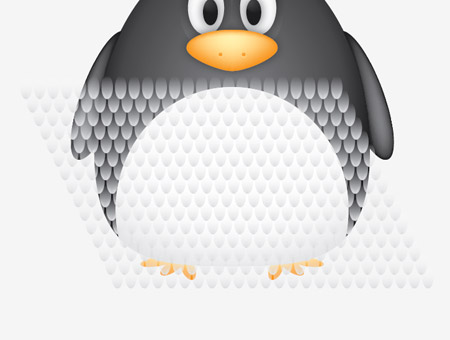
Group all the shapes together then overlay them over the penguin’s belly area. We’ll need to copy the belly shape to use as a tool with the Pathfinder so press CMD+2 to lock the pattern shape so you can select the underlying elements.
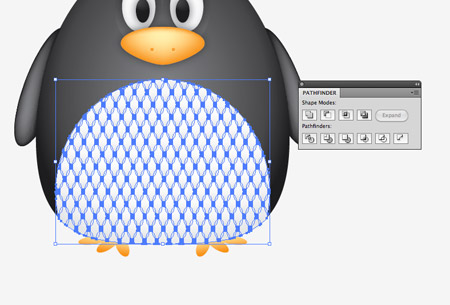
Paste in the belly duplicate and send it to the top (CMD+Shift+]), then with both elements selected (CMD+Alt+2 to unlock all) hit the Crop button from the Pathfinder palette.
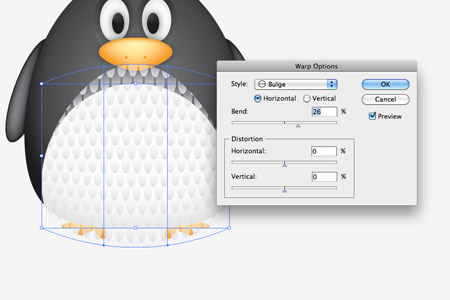
Go to Object > Envelop Distort > Make with Warp and select the Bulge effect. Adjust the setting to give the feather pattern a more three dimensional appearance.
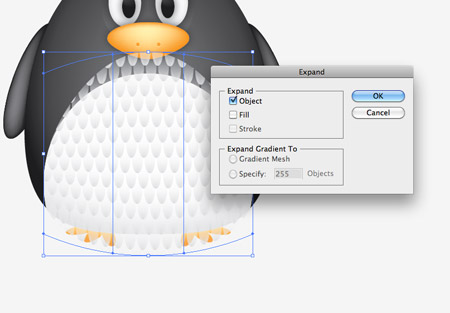
Convert the envelope distort effect to solid shapes by heading to Object > Expand and selecting just the Object checkbox.
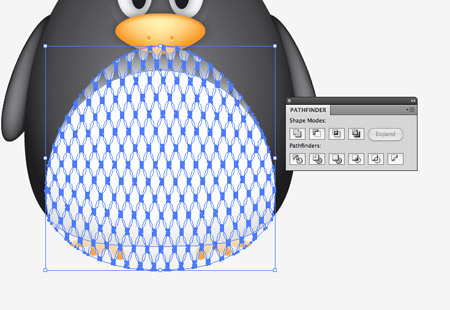
The pattern has broken out of the original belly outline, so paste in another copy of the shape and repeat the Crop function from the Pathfinder to trim everything back to size.
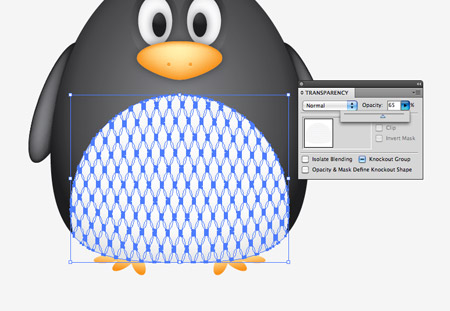
Adjust the opacity of the feather pattern elements so they add to the detail of the character but aren’t too overpowering.
Vector Penguin character
Our cute vector penguin is now complete. We’ve managed to create a whole character using nothing other than circles and ovals, with the help of gradients and shadows to add a touch of depth and dimension to the design.

Create Disk Image Partitions Using Clonezilla


Clonezilla is a live image we can use to reply:
  • Making an image the partition (can partition the data or the Operating System) and restore the image.
  • Creating hard disk image and restore image, etc
Proses2 can we do locally or directly over the network / server. 
With Clonezilla we can do all these things very easily.
Please download Clonezilla here.
Choose one, ane pake yg own Alternative Stable (Ubuntu-based)
Burn to CD or Flash Drive.

Here is an example when we create a partition image ...
1. Boot CD / USB Clonezilla.

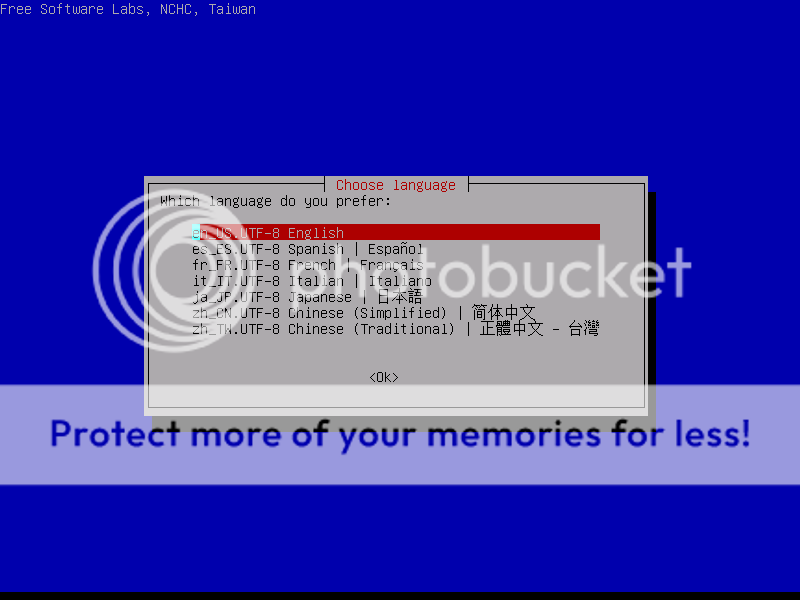
 2. Choose Language
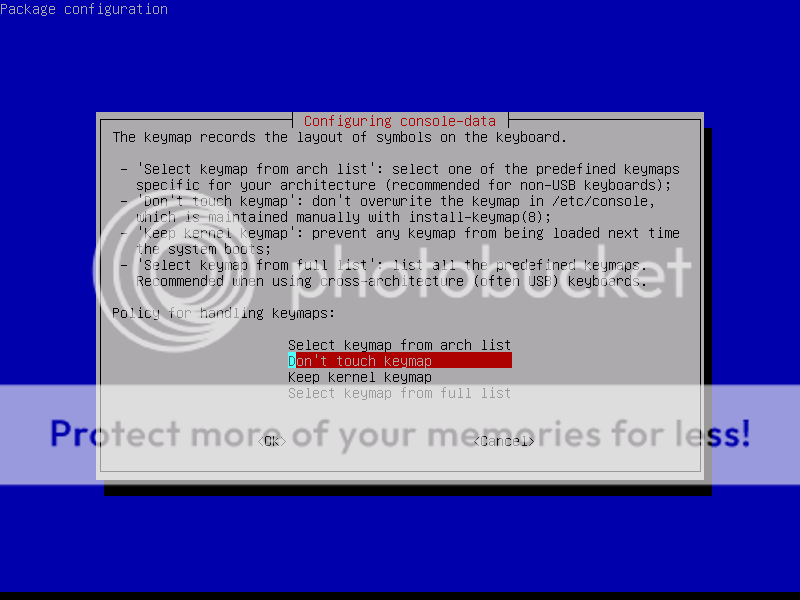
3. Choose keymap

[Top 5] Skin minimalist Conky for Ubuntu desktop

Conky is a lightweight and simple program that serves for the monitoring system on the Ubuntu desktop. Conky can be modified at will we, from the display to adjust the function of what appears didesktop.

In addition to its function of interest, Conky is also often used as a Linux desktop decoration program, and not infrequently found a cool Linux desktop Conky contained therein.

For those of you who like minimali desktop Linux, I will divide five fruit-themed skins minimalist Conky. Click image to go to the download link.


1. Gotham – Conky config by ~psyjunta

Gotham - Conky config

2. Zegoe for Conky by ~iHackr

Zegoe for Conky

3. Cowon Conky by ~BigRZA

Cowon Conky

4. Lite Conky Set by *vR-17

Lite Conky Set

5. Conky – Ethereal by ~Fenouille84

Conky - Ethereal

Ubuntu 11.10 Beta Review

The first beta release of Ubuntu 11.10 has been made available for download – but what can you expect to find?
If you’ve been following the development of Ubuntu 11.10 either here on OMG! Ubuntu! or by being brave and testing the various Alpha releases then you won’t find a great many surprises in the recap below – so here’s the download button ;)

But for those new to camp Oneiric Ocelot (that’s the codename for Ubuntu 11.10), here’s a quick look at some of our favourite changes from Ubuntu 11.04 to now.
Do remember that Ubuntu 11.10 is still in development; what you see below is not representative of the final product due mid-October.

Ubuntu 11.10 Beta

Installation

The Ubuntu installer remains a straightforward and user-friendly process. A new ‘user photo’ step is presented during the set-up which allows you to choose or take a picture (using your webcam) for use as your user picture. Later on you’ll see just why having a user picture matters…

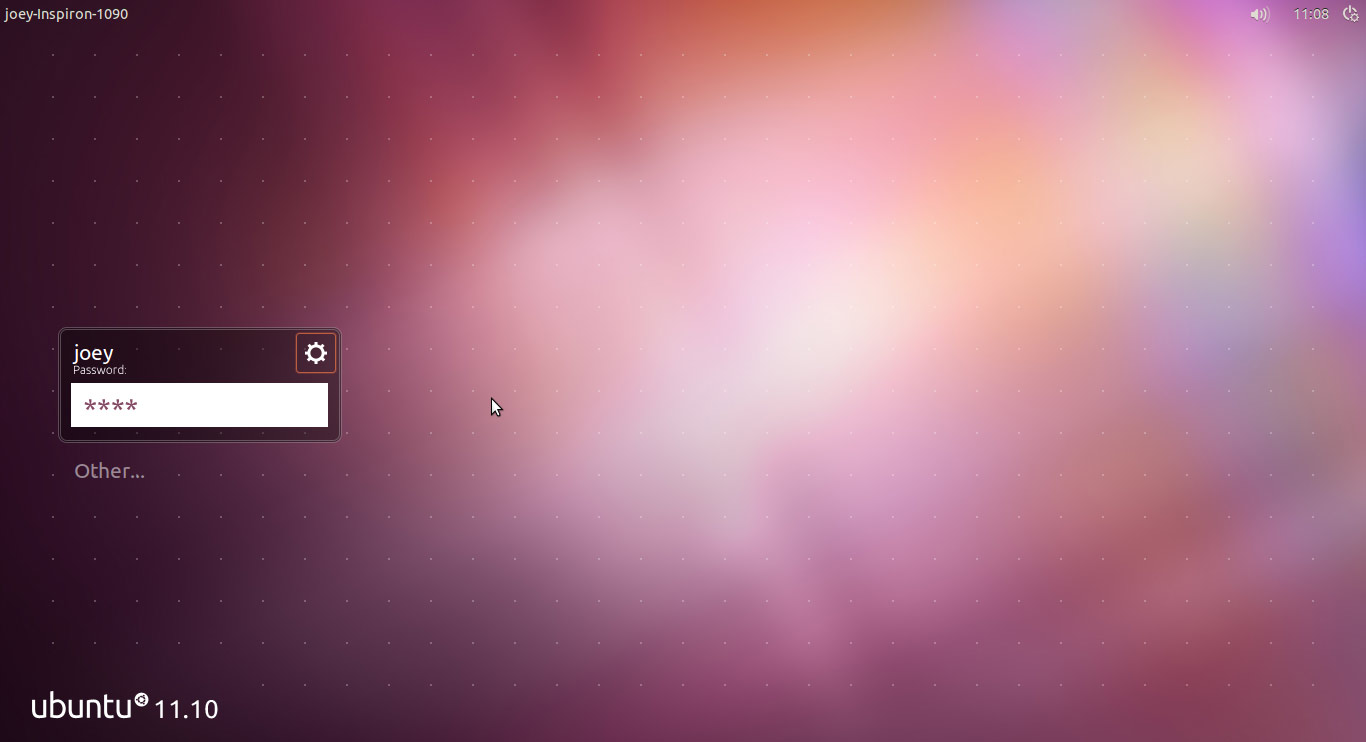
New login screen

Ubuntu 11.10 now uses a different technology for displaying the login screen called ‘LightDM’. This change has allowed the Ubuntu design team to craft an entirely new greeter fitted out with slick effects and an even slicker look.

On the whole LightDM works as it should, although I did detect some noticeable lag when using it on my netbook. On my desktop the greeter worked well.

Applications

The default application set has been updated and upgraded. You’ll find the following sitting pretty in the beta: -
  • GNOME 3 and associated packages (nautilus, eog etc)
  • Firefox 7 (beta)
  • LibreOffice 3.4.2
  • Shotwell photo manager (with hierarchal tags)
  • Rewritten Gwibber
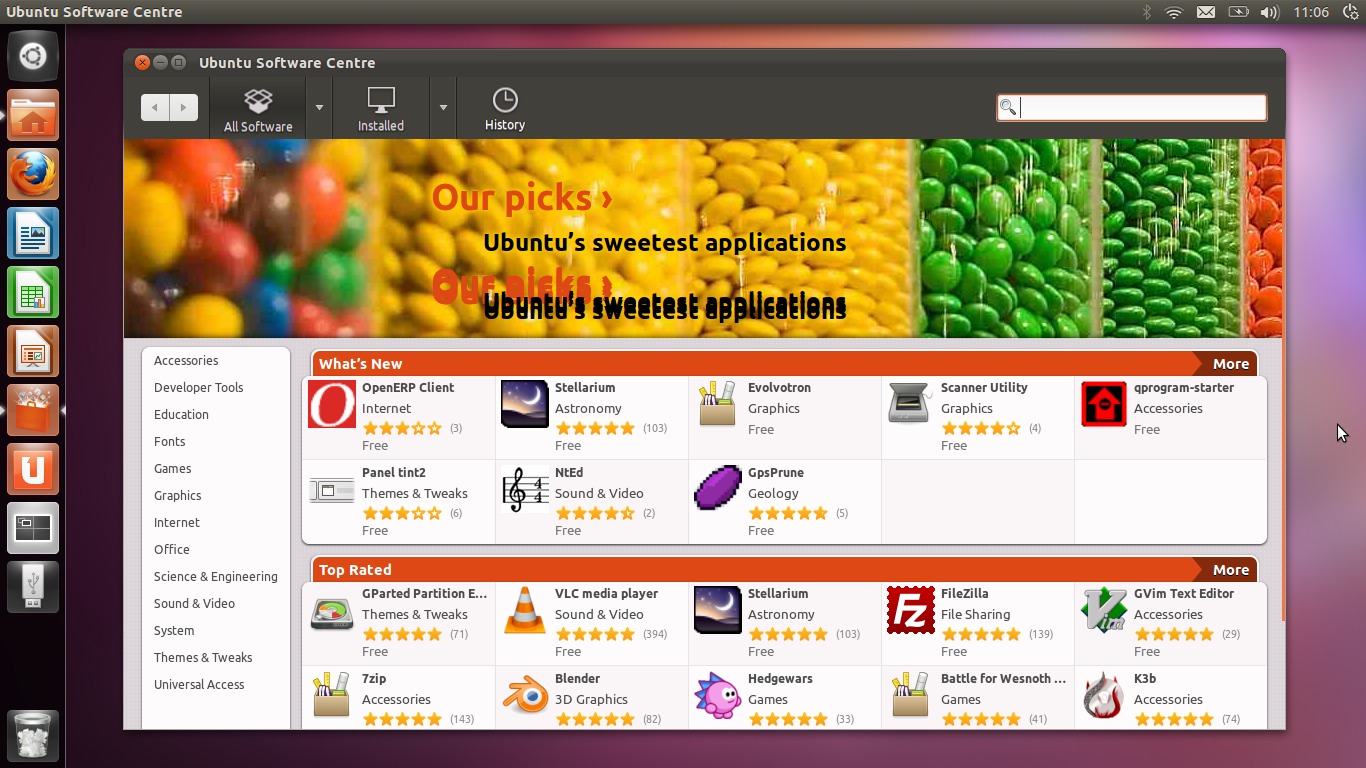
  • Revamped Ubuntu Software Centre

The Dash

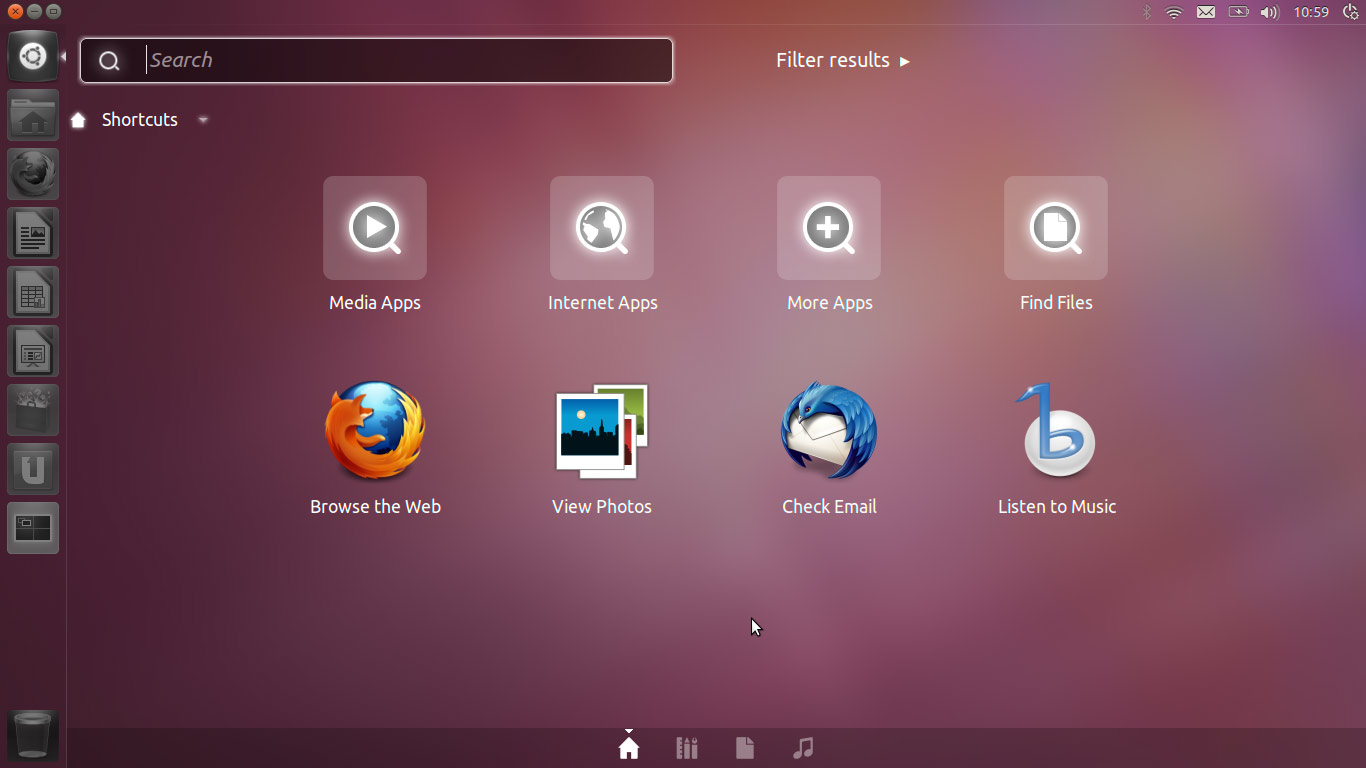
Ubuntu 11.10 builds upon the interface changes introduced in Ubuntu 11.04. Refinements to the Unity interface are apparent: a new look ‘Dash’ ‘triggered’ by a new look launcher-based button are the most visible.
The Dash now has its own window controls, positioned at the top left-hand of the screen, which allow you to maximize the Dash, return it to “half screen” or close it. Fiddly on a touchscreen, but I’ve no need to continually resize the Dash anyway.
In this Beta I experienced a few performance issues with the Dash including lag and weird looking layered icons in search results. If you’re testing don’t expect a perfectly polished performance just yet.

Lenses

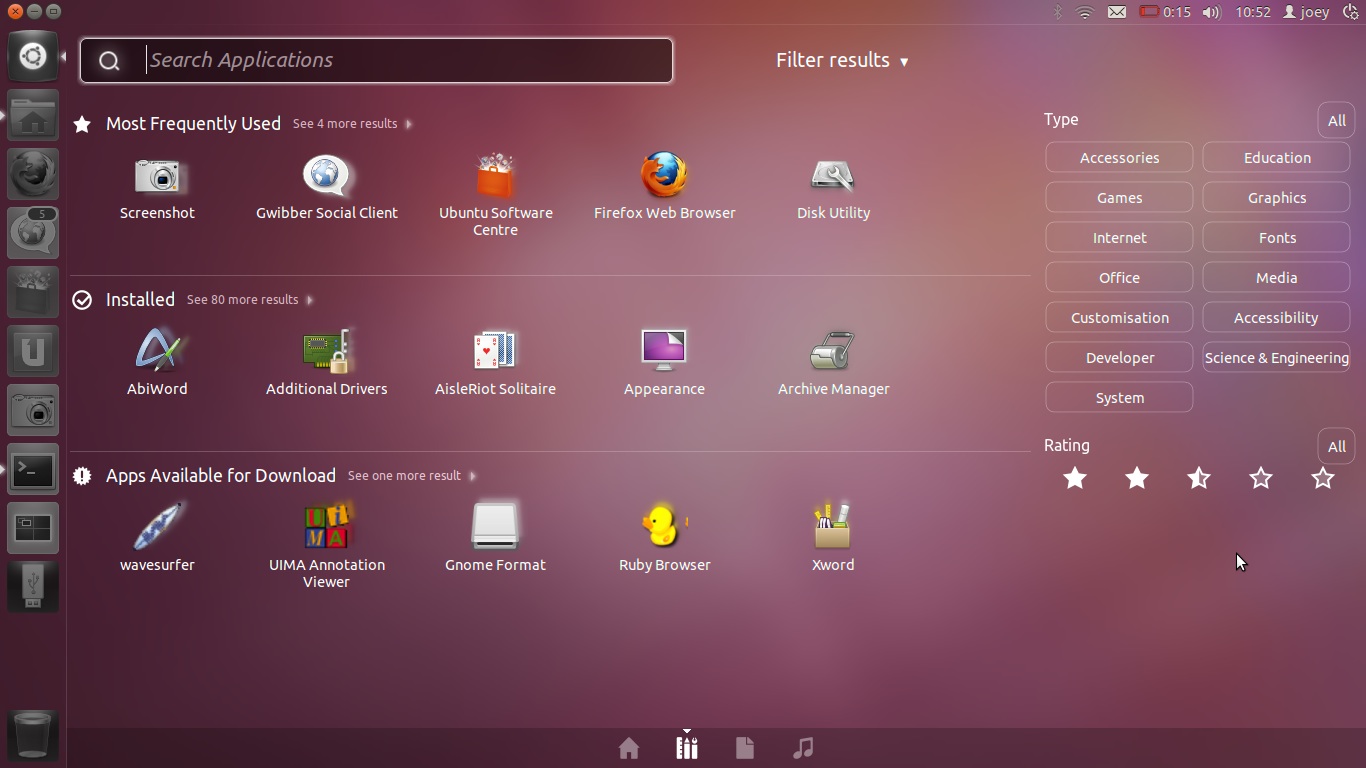
‘Lenses’  provide you with a quick way to search for specific files or information. For Ubuntu 11.10 they have been moved from individual items placed on the Unity Launcher and integrated into the Dash itself. From here Lenses can be selected using the “tabbed” strip of icons towards the bottom of the Dash.
The File and Application Lenses have been brought over to the Dash, and a new Music lens added.

All three have various filtering options: -
  • Filter Applications by category and Ubuntu Software Centre star rating
  • Filter Files by Date created, size or type?
  • Filter Music by date or genre
Personally, I haven’t used ‘Genre’ for filtering my music collection since, well ever. The local record shop used to filter by Genre and it was damn annoying…
Star rating filters 
Applications can be searched by star rankings. Am I really going to have a need to solely find 3 and a 1/2 star music? It seems like a neat solution to have, but it’s one seeking a problem to solve, too.

“OH NOES!! NO WINDOW CONTROLS!!″

The most controversial change present in the Beta is the hiding of window controls on maximized window by default.

When an application window is maximized the window controls, to much controversy, hide by default. Although you only need to mouse over top the panel to access them, many early adopters have reacted negatively to the change citing it as ‘unintuitive‘ and potentially confusing to newcomers.
“Oh, you have to move the arrow to the top of the screen [to see Window Controls]. Odd.”
Whilst the “change” is odd, and a bit daft, I’m rather content with it. But to better help guage whether or not it on the fail side of, well, fail, I hijacked some of the family present at my mothers 70th birthday celebration in order to find out what “casual computer users” – 2 of whom use Windows XP, 1 uses Windows 7 and 1 uses OS X – make of the change…
The Task: Using Ubuntu 11.10, I asked them to close a maximised Firefox window. 
After a few titters at comments such as “This version of Windows looks nice/I like the pretty thing on the side/Is this that new ‘My Windows 7?’”  they got down to completing the task.
Result? All managed it – and all fairly quickly.
I was surprising that all managed to complete the simple task – including my 69 year old Auntie. Only one of my guinea pigs ‘went to the top’ of the screen instantly (the mac user). The rest spent a good few seconds sprinting around the screen with the mouse cursor until the buttons revealed themselves. As soon as they saw the buttons they knew what they did and, when asked to repeat the process 30 mins and 1 sherry later, they all remembered exactly where to find the buttons and how to “reveal” them.
Of course, this unscientific study doesn’t prove that this approach is the right one, and with enough time anyone would uncover the window control buttons eventually, ut it does go some way to show that if non-Ubuntu users can adapt fairly quickly to this change then long-term users of the OS can too. It’s a bit odd, but it’s really rather trivial in the end.

Little things that count

Aside from the big, bold and easily noticeable changes come a raft of smaller UI tweaks and fixes that are worth mentioning: -
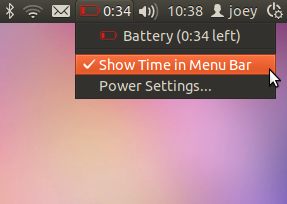
The Battery Indicator now works. An option to display battery time remaining/until charge on the panel can be toggled through the Battery menu.

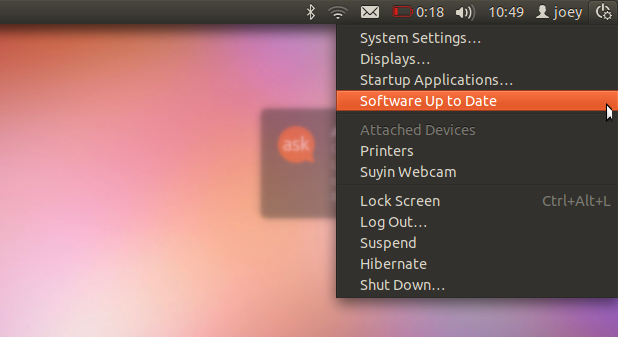
The “Device Menu is a new addition, housing a new icon and various new options, including attached devices and system update status

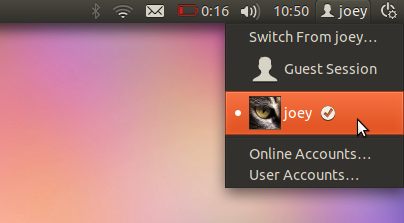
New User Menu with Avatars and Guest user switching: -

Messaging menu with “clear” option lets you acknowledge new tweets, e-mails or IM chats without having to actually open the corresponding app. So simple, yet so welcome.

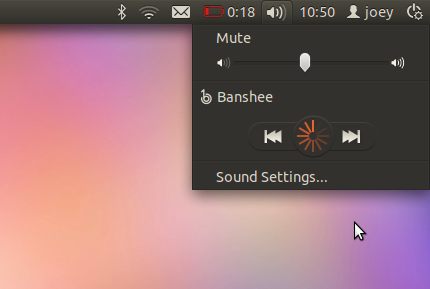
When launching Banshee through the Sound Menu the ‘Play’ button displays a new rounded loading animation. In Ubuntu 11.04 the Play button would simply ‘pulse’.

Linux Ubuntu GamePack 11.04


Ubuntu GamePack is currently the largest collection of different genres of games for Ubuntu Linux. There is no need to explore the Internet in search of game, but finding a game to ask how to install it in Ubuntu Linux.

Ingredients: 6 mb disk (5 DVD discs include 156 most popular games of different genres. As a 6th drive - Ubuntu Desktop 11.04).
On the drive there a brief description of games and game fragments of illustrations, and she liked you install any game - taking a couple of mouse clicks. For the disk must run autorun.sh located in the root directory.

Kit will be interesting to gambling of any age. Here you play in classical chess and solve puzzles, perform aerobatic maneuvers at the controls of an airplane over the metropolis, racer feel, fight for space battles in boundless space, build a city and the enemies of postrelyate machine in today's shooter and dive into the virtual world multiplayer online games.

These discs are not a modification of Ubuntu Linux. They contain only the game, so the system requires pre-Ubuntu Desktop Linux 11.04 (or based on it, such as LinuxMint, SuperOS and others).
The content of discs:


DVD 1 (4.3G) - 47 games
Optimized Urban Terror - Optimized Urban Terror client binary

Vavoom - Quake-like game

Enemy Territory: Quake Wars (Demo) -

Smokin 'Guns - Quake 3 engine is based on the games of the "Old West's"

OpenArena - A three-dimensional fast-paced first-person shooter

Arcade

Pingus - Game is created based on the game Lemmings (Lemmings)

Frogatto - 2D platformer game starring a quixotic frog

Streets of Rage Remake -

Sonic Robo Blast 2 -

Open Sonic - Game based on the "Sonic the Hedgehog"

Neverball - 3D game with a sloping floor

THE SCND GENESIS - Fighting game bases on webcomic

Xmoto - 2D motocross game

Scorched3d - 3D game artileriyskaya similar Scorched Earth

Legends - Fast-paced FPS online multiplayer game

Wormux - 2D game funny

Lugaru HD - Third-person action game about an anthropomorphic rebel bunny rabbit

Irrlamb - 3D Physics Game

Go Ollie! - Go Ollie!

BZFlag - 3D-game first-person tank battle

SCOURGE - A lot of game platform with open source

AstroMenace - 3d shooter

OpenLieroX - Worms clone with support for online play

Bombic - Like Bomberman Game

Capitan Sevilla - Seville Save from the evil Dr. Torrebruno

Teeworlds - Online 2D shooter

Ardentryst - Action / RPG focused on story and character development

Hedgewars - Playing in the style of Worms

D2X-XL - Descent 2 game port

TORIBASH! - Fighting the new generation

Yo Frankie! - 3D platform game of this generation

Paintown - Paintown 2D fighting game

Secret Maryo Chronicles - A running and jumping games like Super Mario World

Hannah's Horse - Aimed at children playing in the style of Pacman

Rocks'n'Diamonds - Arcade game

SuperTux - 2D arcade classic in the genre of "jump 'n run" in the title role in Tux'om

I Have No Tomatoes - Tomato game of destruction

Armagetron - 3D Tron-like high speed game

Battle Tanks - "Tanks" with multi-user mode and split screen

Extreme Tux Racer - 3D racing game with Tux, the penguin Linux

Atomic tanks - Tank battles

Trackballs - The balls in the maze

LBreakout2 - Game-type ball-and-paddle with nice graphics

Blob Wars: Episode II - Three-dimensional game-shooter

BRIQUOLO - 3d Breakout at a rapid pace

Nikwi - Platform game where your task - to collect candy

Neverputt - 3D Miniature Golf


DVD 2 (4.3G) - 17 games
Arcade
Asylum - A shooter platform
Goonies - Aa remake of the 8-bit 'The Goonies'
Robombs - Free multiplayer 3D game like Bomberman

Logic and Puzzle
PyTraffic - A Python version of Rush Hour
Caph - Playing like "sand box", based on the laws of physics.
Numpty Physics -
OGS Mahjong -

FPS (First Person Shooter)
America's Army - v.2.5.0
Assault Cube - Realistic first-person-shooter
World of Padman - World of Padman Client
Warsow - Fast 3D first-person shooter
Red Eclipse - Single-player and multi-player first-person ego-shooter
Alien Arena - A single 3D online first-person shooter
Enemy Territory - Multiplayer shooter
Blood Frontier - Single and multiplayer first-person shooter
True Combat Elite - An Enemy Territory modification
Tremulous - People against strangers. Command shooter with elements of real-time strategy


DVD 3 (4.3G) - 28 games
Arcade
Steel Storm - Episode I

FPS (First Person Shooter)
Revenge Of The Cats - Fast-paced, team multiplayer FPS
Nexuiz - Swift 3D first-person shooter
Sauerbraten - Shell game 3D first-person

MMORPG (massively multiplayer online role playing)
Savage XR -
Daimonin Online -
RuneScape -
IConquerU -
Auteria Online -
Tibia Online -
Regnum Online -
Online Wakfu -
Eternal Lands - The client package for Eternal Lands, a free MMORPG
Project Diaspora - 2D Space Trading MMORPG

RPG (RPG)
SoulFu - Graphical role-playing game similar to Rogue
Lips Of Suna - Game with elements of action-RPG
Warlock's Gauntlet - Dyablopodobnaya game
Freedroid RPG - RPG based on the isometric Paradroid
The Ur-Quan Masters - Intergalactic Adventure

Logic and Puzzle
Jag - 2D arcade puzzle
OpenAlchemist - Open Alchemist
5Ball - A small application logic
Vertris - Tetris clone
Deadly Cobra - Like the classic game Nibbles (tm)
Zaz - Puzzle game
Biniax-2 - Logic game with arcade and tactical mode
PipeWalker - String any all computers in network
Fish Fillets - Pazlovaya game about witty fish, save the world


DVD 4 (4.3G) - 27 games
Racing in cars
Super TuxKart - A game in racing karts
StuntRally - Rally game with stunt elements
VDrift - Cross-platform open simulator
Speed Dreams - Racing simulator
Tile Racer - 3D stunt racing
The Open Racing Car Simulator - A three-dimensional (OpenGL) racing simulator

Space
NAEV - 2D game competition in trade
Funguloids - Space-flying-mushroom-picking-simulator game
The Babylon Project - Babylon 5 modifications for FreeSpace 2 SCP
Oolite - Oolite cosmological simulation for portable GNUStep / OpenGL linux

Strategy
OpenRA -
Freeciv - Civilization turn-based strategy
Pax Britannica - One-button real-time strategy game
TripleA - Turn-based strategy
Megaglest - A free 3D real-time customizable strategy game
FreeCol - A free version of Colonization
Warzone2100 - 3D strategy relnogo time
UFO Alien Invasion - Create your team and stop the aliens
Spring RTS - Real-time strategy
0 AD - A war / economy strategy game
Widelands - Fantasy real-time strategy
Bos Wars - A futuristic real time strategy
8Kingdoms - 3D turn-based strategy
MegaMek - Network Java clone BattleTech
The Battle for Wesnoth - a turn-based strategy - full versya
Globulation 2 - An innovative cutting edge real-time strategy
NetPanzer - Online multiplayer tactical game


DVD 5 (2.9G) - 37 games
Simulators
Corsix-th - Open source clone of Theme Hospital
OpenTTD - A new implementation of Transport Tycoon Deluxe with enhancements
Zero Ballistics - A mixture of first-person shooter and tank battles
Snowglobe - A new viewer for Second Life
Flight Gear Flight Simulator - Flight Simulator
Unknown Horizons - RealTime economic simulator with strategy elements
CRRCsim - Flight simulator on an airplane
Simutrans - Transportation simulator
Lincity - Town-planning simulator with sophisticated graphics
GL-117 - Flight simulator
Danger from the deep - submarine simulator
openBVE - Train Simulator Driving
The Powder Toy - Physics sandbox game

Strategy
FreeOrion - turn-based game, which aims to space exploration and conquest of the galaxy
Glest - Free 3D strategy

Sport
Maxi Mini Golf -
Underworld Hockey Club - 3D Arcade Hockey from the Underworld
Free Tennis - Realistic simulator of tennis.
DreamChess - 3D Chess
Foobillard - three-dimensional billiards, use OpenGL
BillardGL - three-dimensional billiards

Commercial
Soldier of Fortune -
FizzBall (Demo) -
World of Goo - Demo - A puzzle game with an emphasis on physics.

Editors
Sandbox Game Maker - 3D game developed by corporate for children
Syntensity - A platform for 3D games

Space
Vegastrike - 3D space battles

Logic and Puzzle
Angry Drunken Dwarves - A puzzle of "falling blocks"
Frozen-Bubble - Bursting balloons!

Fedora 15 DVD ISO (I386/x86/x64) Free

http://i25.lulzimg.com/7a6f38.jpg

Fedora 15 DVD ISO (I386/x86/x64) | 6.74 GB Free

Fedora Linux version 15 has been released and available for download ( jump to download link ). Fedora Linux is a community-based Linux distribution which is sponsored by Red Hat, Inc. Fedora is considered as the second most popular cutting edge distro, behind Ubuntu Linux for desktop and laptop usage. The new version comes with several new features such as special focus on desktops, developers, virtualization, security and system administration.

What's New In Fedora 15

The new features in Fedora Linux ver. 15 are:
GNOME 3 desktop environment
Btrfs filesystem
Indic typing booster
Better crash reporting
Redesigned SELinux troubleshooter
Higher compression in live images
Better power management
LibreOffice productivity suite
Firefox 4 web browser
KDE plasma workspaces 4.6 and Xfce 4.8 desktop environments
Sugar .92 learning platform
Robotics Suite -- Fedora 15 now includes the Robotics Suite, a collection of packages that provides a usable out-of-the-box robotics development and simulation environment.
GCC v4.6
GDB v7.3
Programming language updates -- Python v3.2, OCaml v3.12, Rails v3.0.5
Maven v3
systemd system and session manager
Dynamic firewall
BoxGrinder appliance creator
Spice integration in Virt Manager
Consistent network device naming
Setuid removal
Improved support for encrypted home directory
RPM 4.9.0 package manager
Tryton ERP system


DOWNLOAD :


http://fedoraproject.org/get-fedora


or


http://www.filesonic.com/file/1684013611/Fedora-15-i386-DVD.part1.rar
http://www.filesonic.com/file/1684013621/Fedora-15-i386-DVD.part2.rar
http://www.filesonic.com/file/1684013631/Fedora-15-i386-DVD.part3.rar
http://www.filesonic.com/file/1684013641/Fedora-15-i386-DVD.part4.rar
http://www.filesonic.com/file/1684013651/Fedora-15-i386-DVD.part5.rar
http://www.filesonic.com/file/1684013661/Fedora-15-i386-DVD.part6.rar
http://www.filesonic.com/file/1684013671/Fedora-15-i386-DVD.part7.rar
http://www.filesonic.com/file/1684013681/Fedora-15-i386-DVD.part8.rar
http://www.filesonic.com/file/1684013691/Fedora-15-x86_64-DVD.part1.rar
http://www.filesonic.com/file/1684013701/Fedora-15-x86_64-DVD.part2.rar
http://www.filesonic.com/file/1684013711/Fedora-15-x86_64-DVD.part3.rar
http://www.filesonic.com/file/1684013721/Fedora-15-x86_64-DVD.part4.rar
http://www.filesonic.com/file/1684013731/Fedora-15-x86_64-DVD.part5.rar
http://www.filesonic.com/file/1684013741/Fedora-15-x86_64-DVD.part6.rar
http://www.filesonic.com/file/1684013751/Fedora-15-x86_64-DVD.part7.rar
http://www.filesonic.com/file/1684013761/Fedora-15-x86_64-DVD.part8.rar

 
Picasa

Pengikut